
eS FAC Serve

FAQ

FAQ

FAQ: How can we help you?
What are you looking for?

General questions

Regarding frequently asked questions.

This FAQ page is designed to answer the most frequently asked questions our customers have about the eS/FAC Serve application. If you don't find the answer to your question here, please feel free to contact our support team. We are always happy to help!

The eS/FAC Serve application is a system designed to improve your operations, enhance communication, and increase customer satisfaction. It covers the management of all services in all types of buildings, including cleaning, maintenance, gardening, pest control, security, safety, and other services.


The eS/FAC Serve application is ideal for businesses managing all types of building services, including cleaning, maintenance, gardening, pest control, security, safety, and other services. It's also perfect for service providers or building managers who want to optimize building service operations. The system can support everything from small buildings or service teams to large-scale management across multiple departments and service teams.


We offer a free trial so you can try out all the features of the eS/FAC Serve application and see how it can benefit your business.


The eS/FAC Serve application offers several pricing plans to suit your business needs.

Troubleshooting

FAQ page: Frequently Asked Questions and Troubleshooting section.

Common problem solving
Having trouble getting your eS/FAC Serve application to work as expected? Don't worry, we've got you covered! This section addresses common issues you might encounter and provides simple solutions to help you get back on track. If you don't find the answer you're looking for here, please contact our support team for further assistance. Keep your automation running smoothly!

FAQ

FAQ

FAQ

FAQ

FAQ

FAQ

FAQ

FAQ

FAQ

Supported browsers
All KPTM applications support the following current browser versions on Windows, Mac OS, iOS, and Android operating systems:

Google Chrome
Apple Safari
Mozilla Firefox
Microsoft Edge

JavaScript
Our application requires JavaScript firewalls and advanced security features. Some of these will disable JavaScript.

Session Cookies
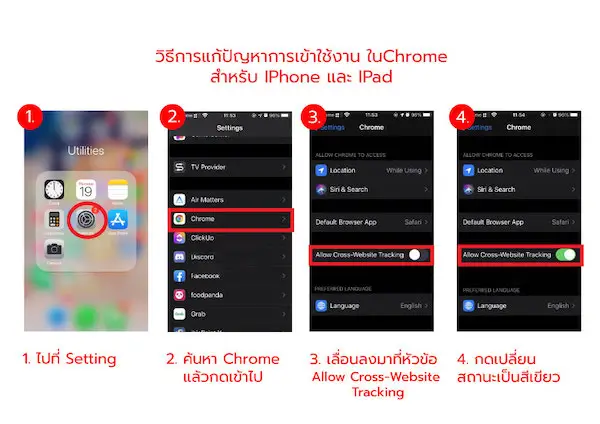
Our authentication module requires third-party cookies to be enabled. If you are using a browser that has third-party cookies disabled or has cross-site tracking protection enabled, you will not be able to log in to our application or may experience issues filtering data in reports. In this case, an initial system message will appear to inform you of the problem.

How to enable cookies in your browser.
The following section shows the steps to enable cookies and cross-site tracking in different browsers:

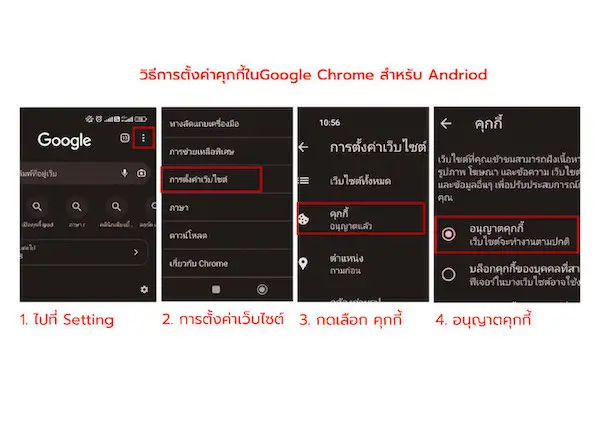
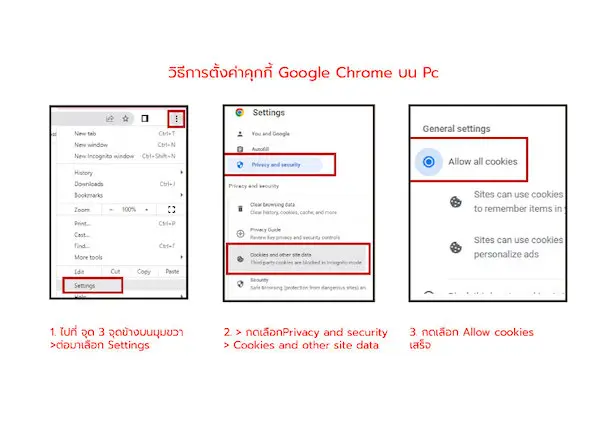
Google Chrome
Safari on Mac OS
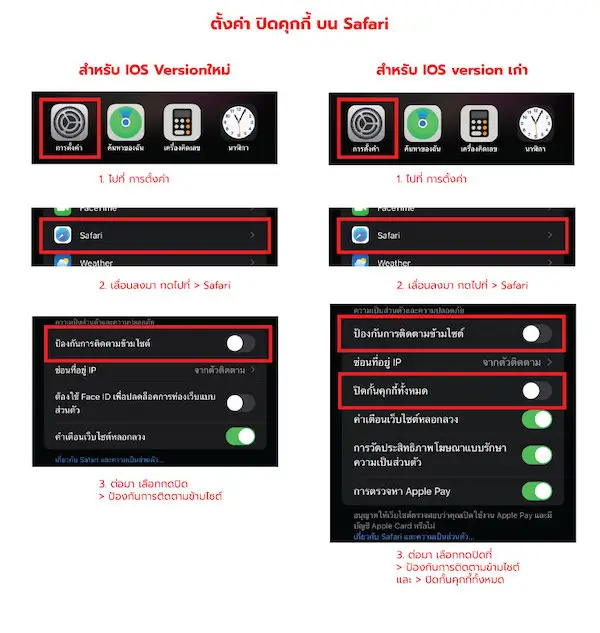
Safari on iOS (iPhone and iPad)
Mozilla Firefox
Microsoft Edge

GOOGLE CHROME
1. In the upper right corner of your browser, click Customize and control Google Chrome, then click Settings.
2. On the Settings page, click on Privacy and security.
3. Click on Third-party cookies, then select the Allow third-party cookies button.

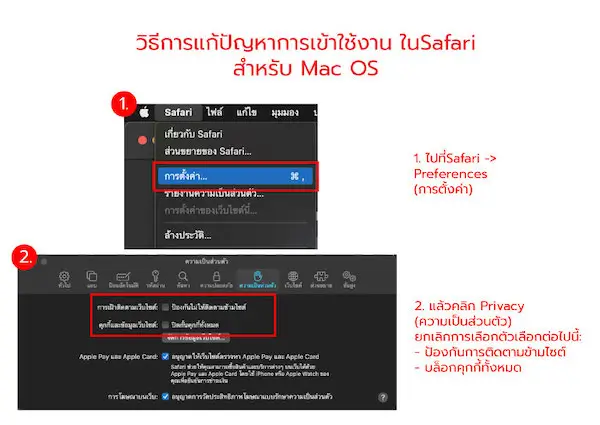
Safari on MAC OS

1. On the Mac OS bar, click Safari > Settings.
2. Click on Privacy and uncheck "Prevent cross-site tracking".
3. Click Advanced Settings, then uncheck "Block all cookies".

Safari on iOS (iPhone and iPad)

1. Go to Settings > click Safari.
2. Select Privacy & Security and turn off the Prevent Cross-Site Tracking option.
3. Go to Settings > Safari > Advanced.
4. Click on Privacy and turn off the "Block All Cookies" option.

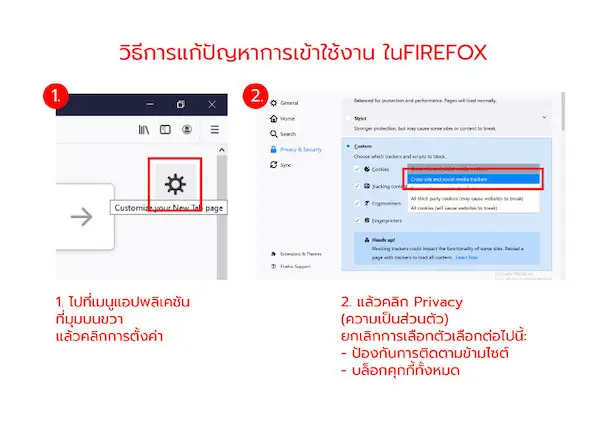
Mozilla Firefox

1. In the top menu bar, click Firefox, then select Preferences.
2. Select Privacy & Security.
3. Select either Standard or Custom.
4. For the Custom option, select "Cross-site tracking cookies, and isolate other cross-site cookies" according to your Cookies settings.

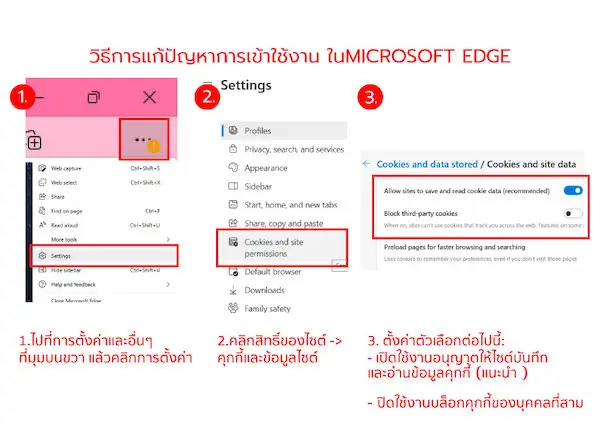
Microsoft Edge

1. In the upper right corner, click Settings and more, then click Settings.
2. Click Cookies and site permissions.
3. On the Cookies and data stored page, click Manage and delete cookies and site data, then set the following options:
>Turn on Allow sites to save and read cookie data. (recommended)
Turn off Block third-party cookies.

Using the eS/FAC Serve application.

How do I get started with the eS/FAC Serve application?

Getting started with the eS/FAC Serve application is easy! Simply register for a free trial on our website and follow the on-screen instructions.

The eS/FAC Serve application offers a wide range of features to help you manage your business, including attendance tracking, quality control, complaint handling, event planning, reporting, and mobile access for your employees.

Creating building service management assignments in the eS/FAC Serve application is quick and easy. Simply enter client information, job details, location, and any special instructions, and the software will automatically assign the task to the most suitable person based on their availability and skills.

The eS/FAC Serve application allows you to track the progress of your work in real time. You can see which tasks have been completed or are in progress, and receive updates from your team.

Safety and data.

Will my data be safe when using the eS/FAC Serve application?

The eS/FAC Serve application takes data security very seriously. We use industry-standard security measures to protect your data, including encryption and access control.

Only authorized users with the appropriate permissions can access your data in the eS/FAC Serve application. You can control who can access your data and the level of access they have.

We use cookies to collect information about your activity. Cookies are small text files that web applications transfer to your browser. These cookies may also be stored on your hard drive or smart device. In many places, application pages utilize what are called cookies to help make our offers more efficient, user-friendly, and secure. Cookies are stored on your device and saved by your browser. All cookies we use are called “session cookies.” These are automatically deleted at the end of the session. Cookies do not harm your device and do not contain any viruses.

Features and functions

Daily coordination issues include staff shortages, lack of a central information center, and delays in receiving information about problems.

Building service businesses such as cleaning, maintenance, gardening, and pest control.

Security companies often face daily challenges in managing their workforce, from recording employee numbers in each department and handling staffing shortages to generating reports for clients. Without a proper system, these issues can lead to delays, errors, and customer dissatisfaction.

One of the primary challenges in workforce management is recording daily employee numbers. Traditional methods, such as manual recording or paperwork, can lead to delays and incomplete data, resulting in employers lacking clear information. Furthermore, responses to staffing shortages are often delayed due to the absence of a clear notification system. Accurate reporting of daily employee numbers is crucial; incomplete data can impact reliability and cost management.

A real-time daily manpower recording system is the answer to...

These problems are addressed by this system, which allows managers to track the number of employees in each location.

The real-time system provides alerts for anomalies, such as staff shortages, enabling quick adjustments to project plans. Furthermore, the system generates comprehensive and accurate summary reports, allowing clients to review information immediately, reducing communication complexity and increasing transparency in the workflow.

Click here to view the Manpower module details.

Performance monitoring and measurement are critical processes in building service businesses, such as cleaning, maintenance, or security. Traditional data collection methods, such as paper-based records processed via spreadsheets, can be slow, unreliable, and result in management lacking up-to-date information. Such delays in processing make it difficult to analyze trends and develop quality improvement strategies. A lack of timely data can undermine the potential for improving service quality.

Real-time inspection system powered by the eS/FAC Serve building service management system.

This tool is designed to address these problems. The system allows users to design custom inspection sheets to meet their needs and the characteristics of the area being inspected. The capability...

Real-time evaluation and recording of results ensures that recorded data is immediately available. Management can quickly analyze quality trends, implement preventative measures, and improve operational efficiency.

Click here to view details of the Inspection module.

Recording events in building services such as cleaning, maintenance, and security is a crucial process for improving operational efficiency. If data collection is inconsistent or incomplete, this information may not be fully utilized, leading to inaccurate problem-solving planning and system development.

Maintaining complete and continuous records of incidents allows management to analyze and plan effective preventive measures. Clearly recorded data, such as incident details, date, time, and impact, can be used to improve work processes, enhance safety, and reduce risks in the long term.

The use of real-time digital event recording systems provides easy and rapid access to information, supporting accurate decision-making. Analyzing events helps identify weaknesses in the system and allows for planning improvements to reduce the likelihood of recurring problems. This builds confidence among clients and team members and also helps reduce long-term costs through the implementation of appropriate preventative measures.

Click here to view the Incident module details.

Building management tasks such as cleaning, maintenance, gardening, pest control, security, and other services require a system that enhances clarity and efficiency. The Work Order system in the eS/FAC Serve building services management system is designed to support operations across all building services, from small service teams to large multi-team organizations.

The Work Order system helps record the time of notification and sets target completion times for tasks. When a task is assigned, the system records detailed task information, including accompanying images, to enhance clarity for the task recipient. When the assigned person accepts the task, the system records the acceptance time, and upon completion, the system records proof of work and the complete task end time.

This feature not only increases transparency in the process but also helps accurately assess team performance. The collected data can be easily used to analyze job response times, execution times, and the number of pending tasks, as well as the status of delayed tasks, all through a dashboard.

With comprehensive and readily available data, the Work Order system simplifies management, increases client trust, and supports long-term service quality development for all types of building services.

Click here to view the Work Order module details.

Inspections in building service industries, such as cleaning, maintenance, gardening, or security, often face challenges due to inspection forms that don't align with the specific needs of each area. Neutral forms may lack appropriateness and fail to collect accurate and complete data, leading to delays and disorganization in the data management process.
Inspection system ineS/FAC Serve Building Service Management System This system offers a solution to this problem. With its freely customizable form design capabilities, the system allows you to create forms tailored to the specific needs of your area and type of work, from quality control checks and safety checklists to workplace hygiene inspections. The recorded data can be immediately utilized in a variety of formats.

With its flexible system, users can systematically record the number of tasks at each location, verify completeness, and store other important data. Whether it's area safety inspections, hygiene assessments, or recording other specific information related to building services, this system simplifies, increases accuracy, and supports a wide range of uses for service teams of all sizes. Click here for details on the Inspection module.

Planning in building services businesses, such as cleaning, maintenance, or security, should not be confined to paper-based formats. Storing inaccessible records can lead to a lack of crucial information about the status of pending tasks and may impact operational continuity.

The PE/PM schedule management function in the Building Management System.

eS/FAC Serve is a tool that simplifies and enhances project planning. You can plan projects up to a year in advance, with a system that provides reminders for deadlines. The system also facilitates the status updates of completed tasks. All information is displayed in a clear calendar format, allowing managers to easily monitor project progress.

Gaining a comprehensive view of your work through this system ensures that all tasks are being performed according to plan, reducing errors and increasing transparency in task management. The PE/PM project management function also reduces the burden of traditional task recording and supports modernizing workflows.

Click here for details on Periodic Work.

Customer complaints regarding building services such as cleaning, maintenance, or security can relate to various issues, including substandard quality, delayed problem resolution, or incomplete work. Without an effective complaint management system, these problems can accumulate and impact customer trust in the overall quality of management.

The Customer Complaint system via the Customer Portal provides a channel for customers to log in to check general work details and directly record complaints. Complaint information is sent directly to the responsible manager, both in the area and at the central level, facilitating quick and efficient coordination and follow-up. The system also supports reporting the results of the action taken back to the customer, ensuring that the problem has been appropriately resolved.

With transparent and timely management, a Customer Complaint system improves operational efficiency and reflects the organization's commitment to service. Rapid responses and clear reporting enhance a positive image and foster lasting customer satisfaction. Furthermore, it allows management to analyze complaint data for long-term quality improvement planning and supports the management of service teams of all types and sizes within the building.

Building management tasks such as cleaning, maintenance, or managing large service teams require clear and readily accessible data. The eS/FAC Serve building services management system provides powerful dashboards that give managers a comprehensive overview of all data. These dashboards are designed to present complex information in an easy-to-understand format, saving time in analysis and decision-making.

The data displayed on the dashboard can be customized to suit each organization, whether it's monthly, annually, or specific data. Executives can view summaries in graph, table, and key numerical formats at once, such as calculations from 10 reports, 14 graph types, and 5 data tables, all designed to support effective work tracking and planning.

With its ability to present data in short bursts and record data over the long term, this system simplifies in-depth data analysis. Management can use the data to track progress, identify issues, and sustainably improve operational efficiency across all building services. The eS/FAC Serve building services management system not only clarifies processes but also instills confidence in professional management.

In building service roles such as cleaning, maintenance, and on-site resource management, access to accurate and up-to-date information is crucial. On-site Information Systems (AI systems) have been developed to address the challenges of fragmented and inconsistent data management. Critical information such as job details, staffing levels, equipment, and company assets at each operational point are comprehensively collected and stored within this system.

One of the system's standout features is its data forwarding capability. When there's a change in responsibility, information is immediately transferred to the new administrator, minimizing delays and operational errors. Managers can easily monitor the availability of resources in the area and confirm that operations are proceeding according to established agreements.

This system is also used to record crucial information for coordination, such as lists of executives from both the service provider and customer sides. This information is essential in cases where urgent contact needs to be escalated, ensuring smooth and continuous communication.

On-site information not only improves the efficiency of managing on-site data but also ensures transparency and compliance with established standards. This system is therefore ideal for upgrading building management in all types and sizes to accommodate continuously changing needs.

Click here for On-site Information.

Managing tasks in buildings with diverse areas such as offices, restrooms, or parking lots often presents challenges with specific inspection requirements for each point. The task inspection scanning module simplifies this process by integrating QR code scanning technology into workflows.

When an operator scans a QR code at the point of work, the system automatically selects the form appropriate for that task in that area. For example, if scanned in an office area, the system will only display forms relevant to the office space and will not show irrelevant information, such as lists for parking areas or restroom fixtures. This way, it reduces complexity, increases accuracy, and reduces errors that may occur from using the wrong data.

The Scan2Inspect module enables fast and efficient inspections, ideal for managing all types of building operations, from small service teams to projects with diverse spaces. By implementing this technology, management can be confident in the quality of work and the consistency of recorded data professionally. Click here for Scan2Inspect details.

eS/FAC Serve Building Service Management System Designed to store all data in a complete and secure database format, including content and images. Data is recorded with important details such as the name of the recorder, date, time, location, and other relevant information. With this data recording method, management can generate reports instantly as needed and easily trace or search for past data.
The ability to systematically store data in a digital format allows users to access complete raw data and use it for analysis to improve work quality, enhance operational efficiency, and continuously develop services. This system is suitable for...Building Services ManagementSuitable for all types, supporting both small service teams and large organizations with complex data structures.
Using databases in...eS/FAC Serve Building Service Management System Not only does it simplify task management, but it also ensures the quality and reliability of stored data, making every operation transparent and highly efficient.

Building service businesses, whether cleaning, maintenance, gardening, pest control, or security, all rely on a continuous supply of materials and equipment. Inventory management is therefore a crucial factor affecting service quality. Lack of systematic control can lead to errors, losses, and a negative impact on client trust.

One common challenge is not knowing the actual number of materials and equipment remaining at the worksite. Traditional management methods, such as keeping records or summarizing past data, often result in outdated information, hindering management's ability to accurately plan resource allocation. Furthermore, the lack of clear documentation for issuing and returning equipment increases the risk of loss or overuse. Some items may run out unexpectedly, impacting operations and causing service delays. In addition, preparing periodic stock reports is time-consuming and requires meticulous attention to detail.

Effective inventory management should begin with real-time data recording from the field, ensuring that inventory levels always reflect the true situation. Linking material usage to repairs and maintenance provides a clear picture of the costs incurred in each task, and allows for transparent review of withdrawal history, reducing disputes and increasing reliability in the work process.

Furthermore, continuously analyzing usage data trends helps management plan procurement effectively, preventing shortages or excessive stockpiling. This results in operational continuity, reduces costs, and enhances overall service efficiency in the long term.

Click here to view details of the On-site Inventory Management module.

All types of building service businesses, whether cleaning, engineering systems, landscaping, pest control, or security, face unforeseen disruptions. Corrective Maintenance (CM) is therefore a crucial process that reflects the readiness to respond professionally to problems. The lack of a clear management system can directly impact service continuity and client trust.

One common problem is that repair requests are submitted through multiple channels, such as phone, LINE, or verbal notifications. This leads to data loss, difficulty in tracing back issues, and the inability to create a complete central database. Without a centralized data system, monitoring the status of repairs becomes difficult. Management lacks a clear overview of ongoing work, resulting in some tasks accumulating without prior notification. At the same time, evaluating the performance of the repair team lacks empirical data, both in terms of response time and problem resolution time.

An effective management approach should begin with creating a Work Order immediately upon receiving a repair request, ensuring that every event is formally recorded in the system, reducing delays and the risk of data loss. Tracking the status of each task, from receiving the request and initiating the process to completion, provides transparency and updates for all parties. Furthermore, a dashboard displaying pending, urgent, and delayed tasks allows management to see an overview and prioritize tasks immediately.

Furthermore, continuously collecting data on response time and resolution time allows for concrete analysis of the maintenance team's performance. This data can be used to improve work processes, plan workforce, and elevate service standards in the long term. This transforms Corrective Maintenance from a mere short-term solution into a data-driven and verifiable process.

Click here to view details of the Corrective Maintenance (CM) module.

In the building management services business, assets are the heart of operations. These include air conditioning systems, electrical systems, pumps, cleaning equipment, and specialized tools. Having accurate and up-to-date asset information is fundamental to effective maintenance planning. Without a proper system, asset management can become a risk that impacts long-term service quality.

One common problem is that asset registers are often outdated or incomplete, making it impossible to clearly determine the quantity, details, or status of each piece of equipment. Furthermore, the lack of immediate access to past repair and maintenance records makes analyzing the condition of machinery or identifying damage trends difficult. When there are changes in personnel or teams, asset information is often lost or incomplete, resulting in a lack of continuity in management and inaccurate future maintenance planning.

An effective management approach should begin with maintaining an asset registry in a single central database, ensuring all parties have access to the same accurate and up-to-date information. Linking asset data to Preventive Maintenance (PPM) plans, Emergency Maintenance (CM) programs , and Asset Management Contracts (AMCs) provides a comprehensive overview of the asset lifecycle and allows for immediate review of repair history, replacement parts, and usage records.

With complete and systematically interconnected data, management can make accurate decisions, whether it's about repairs, efficiency improvements, or planning timely asset replacements. As a result, asset management is not just about data collection, but a strategic tool for controlling costs, reducing risk, and sustainably improving service standards.

Click here to view details of the Asset Management module.

In building management and engineering services, the Annual Maintenance Contract (AMC) serves as a crucial framework defining the scope, responsibilities, and frequency of maintenance as agreed upon with the client. Effective contract management not only impacts service quality but also directly affects reliability and the likelihood of future contract renewals. Without a clear system for controlling AMCs , this can become a weakness for an organization.

One common problem is that AMC contract data is scattered across multiple files or document formats, making it difficult to find and verify information and increasing the risk of using inaccurate data. Furthermore, ambiguity arises regarding which work falls within the contract scope and which is outside of it, leading to disputes or misunderstandings with clients. Simultaneously, forgetting or missing scheduled maintenance intervals can damage professional image. Many organizations also lack a systematic record of actual work performance for contract renewals or renegotiating new terms, as well as a lack of coordination processes for site visits that comply with safety regulations.

An effective management approach should begin with integrating all AMC contract information into a single system, reducing reliance on paper documents and scattered files. Linking AMC contracts to PM / PPM plans and work orders allows for clear control over work scope, reduces the risk of overwork or underwork, and provides real-time status updates on contract maintenance, enabling management to closely monitor progress.

Furthermore, systematically collecting actual operational data, including service dates, details of work performed, and post-maintenance inspection results, can serve as crucial evidence for contract renewals and business negotiations. A system for requesting site access and issuing work permits should also be in place, complying with site safety requirements and standards. This ensures that AMC contract management is a comprehensive, transparent, and verifiable process at every stage.

Click here to view details of the AMC (Annual Maintenance Contract) module.

In building management and technical services, repair work reflects the ability to quickly and efficiently solve immediate problems. However, if data storage and follow-up are not systematic, repairs may become merely temporary solutions, failing to prevent recurrence in the long term.

One common problem is repeated repair requests for the same issues due to a lack of complete repair history data. This prevents the team from accurately analyzing the root cause of the problem. Furthermore, urgent repairs often get inserted into the main work plan, leading to inaccuracies in prioritization and resource management. At the same time, many organizations are unable to concretely assess the quality and results of repairs, and customers lack access to progress tracking, resulting in a lack of confidence in the process.

An effective management approach should begin by linking repair work to asset information and incidents to provide a complete context of the problem. Systematically recording failure symptoms, root causes, and solutions helps create a reliable knowledge base for future reference and reduces the risk of recurring problems.

Furthermore, transparently displaying the progress and status of repairs, from notification and implementation to completion, allows customers and stakeholders to clearly track results, reinforcing confidence in the quality of service. Continuously collecting repair data allows organizations to analyze damage trends and effectively improve long-term preventative maintenance (PM) plans. Thus, repairs become more than just addressing malfunctions; they are a crucial mechanism for sustainably elevating building management standards.

In building management and technical services, particularly in repairs, maintenance, or work involving safety risks, obtaining work permits is a crucial step in controlling risks and ensuring operational standards. However, many organizations still rely on paper-based documents or traditional procedures, resulting in inefficient approval processes and difficulty in traceability.

A common problem is the storage of documents in paper format, making retrieval and verification of past records time-consuming. Furthermore, documents may be lost or incomplete. In addition, the permit application process is often delayed due to the lack of a clearly defined approval sequence, resulting in uncertainty about the permit's status or who has approved it. Simultaneously, stakeholders cannot track the Work Permit status in real-time, leading to inaccuracies in on-site coordination and potentially compromising overall security.

An effective management approach should transform the work permit application and approval process into an online system. This would ensure that all steps are formally recorded and verifiable. Clearly defining the approval process and authorization levels would reduce confusion and increase accountability for each role. Furthermore, supporting documents, such as safety plans, lists of personal protective equipment, or relevant certifications, could be fully attached within a single system.

Furthermore, the ability to instantly check the status and approval history helps management effectively control risks and ensures that all on-site work is carried out within strict safety regulations. This makes the Online Work Permit more than just a documentation tool; it's a crucial mechanism for elevating the organization's safety and transparency standards in the long term.

Click here to view the details of the Online Work Permit module.